KasirPOS
Digital Receipts: How to Send Receipts to WhatsApp from iPhone and iPad
Digital receipts save paper and are easy for customers to keep. Learn how to send receipts to WhatsApp from iPhone or iPad as an image, PDF, or text.
A digital receipt is proof of purchase sent to the customer's phone, usually over WhatsApp, as an image, PDF, or text. With a POS app on an iPhone or iPad, you can send the receipt as soon as the sale is done, with no printer and no thermal paper, and the customer can open it again at any time.
Below you will find why small shops are switching to digital receipts, the format options, what a good receipt includes, etiquette for using customers' numbers, and the steps on iPhone or iPad.
Why shops need digital receipts
- Save thermal paper. Some customers throw paper receipts away immediately. Send a digital receipt only to those who want one, and print only when asked.
- No fading. Print on thermal paper can fade over time. A receipt on WhatsApp stays readable and is easy to find again.
- Proof for kasbon and returns. Customers on kasbon (store credit, a running tab) have the details of what they bought. When exchanging goods, they just show the receipt on their phone.
- Good for remote orders. Orders placed by chat or picked up on someone's behalf can get a receipt in the same conversation.
- Start without a printer. A new shop can sell with receipts and no printer at first, then add a printer later.
For kasbon, digital receipts also make collecting easier because the customer and the shop see the same details. How to do it is covered in the how to collect debts on WhatsApp guide.
Image, PDF, or text: which to use
Digital receipts, also called e-receipts or electronic receipts, can be sent in three forms. Choose based on the customer.
| Format | Advantages | Good for |
|---|---|---|
| Image | Shows right in the chat, looks like a paper receipt, easy to read at a glance | Everyday retail customers |
| Neat when printed or archived, does not change when forwarded | Business customers, resellers, or anyone who needs proof for their office | |
| Text | Lightweight, can be copied and searched in the chat | Customers with old phones or a weak signal |
If in doubt, use an image. It is the closest format to the paper receipts customers already know.
What a good receipt includes
A good receipt answers the customer's questions without them having to ask the shop. Make sure it includes:
- Shop name, address, and contact number
- Date and time of the sale
- Receipt number, so the sale is easy to find if there is a complaint
- Item names, quantities, unit prices, and subtotal per item
- Discount, if any
- Total, payment method, amount received, and change
- Cashier name
- A footer, such as your exchange policy or a thank-you note
A simple example receipt with numbers you can check yourself:
TOKO KITA
Jl. Melati No. 12
19/10/2026 10.15 · INV-261019-0007
Cashier: Rina
Rice 5 kg, 1 × 72.000 = 72.000
Cooking Oil 1 L, 2 × 18.000 = 36.000
Chicken Eggs 1 kg, 1 × 28.000 = 28.000
Subtotal: 136.000
Discount: 6.000
Total: 130.000
Cash: 150.000
Change: 20.000
Goods can be exchanged within 3 days with this receipt.
The math: 72.000 + 36.000 + 28.000 = 136.000. After the Rp 6.000 discount, the total is Rp 130.000, and the change from Rp 150.000 is Rp 20.000.
Etiquette for using customers' WhatsApp numbers
A WhatsApp number is personal data. Customers give it to receive a receipt, not to get a steady stream of promotions.
- Ask first. For example, "Would you like the receipt sent to your WhatsApp?" Do not save a number without permission.
- Use it for its purpose. A number given for receipts is used for receipts and transaction matters, such as order confirmations or kasbon.
- Do not use it for spam. Do not add numbers to groups or send promotions without consent. If you want to send a catalog, ask first whether the customer wants it.
- Keep it private. Do not share customers' numbers with anyone else, and delete them if the customer asks.
In KasirPOS, customer data is stored on the shop's iPhone or iPad, not on the app developer's servers. Still, lock the app with a PIN or Face ID so only authorized people can open that data.
Tip: Send receipts from the shop's WhatsApp number, not the cashier's personal number. Customers know the receipt officially comes from the shop, and customer numbers do not end up saved on staff's personal phones.
How to send receipts to WhatsApp in KasirPOS (iPhone/iPad)
KasirPOS is a free iPhone POS app and iPad app. It runs without internet; the internet is only used when a receipt is sent over WhatsApp.
Right after payment
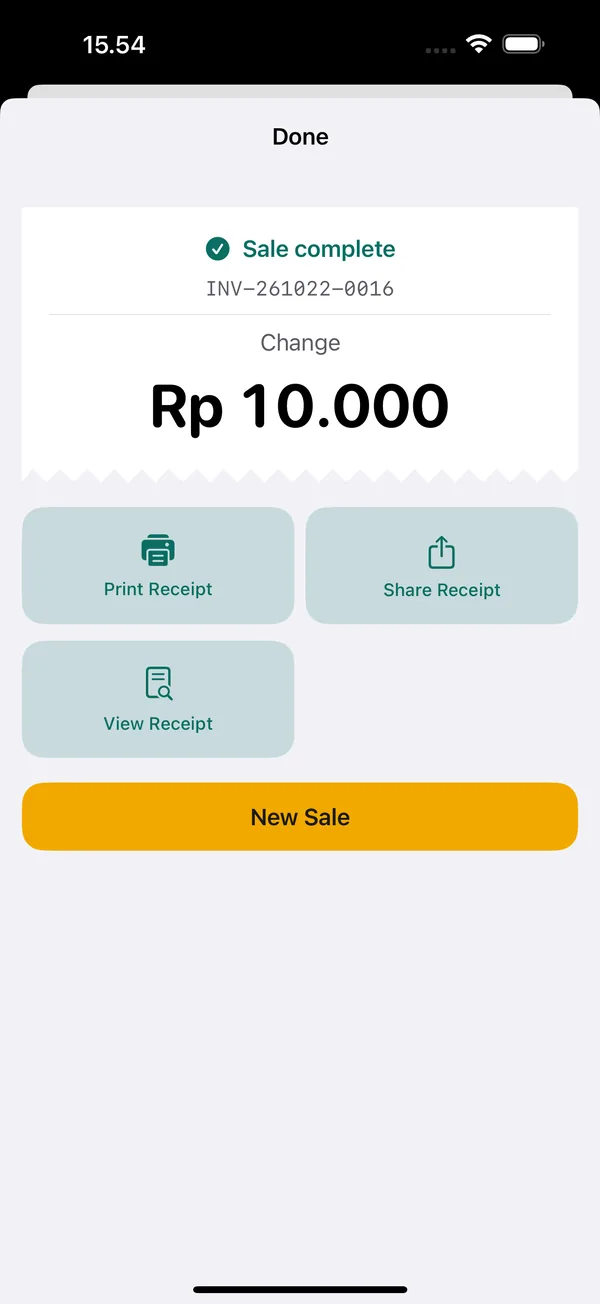
When payment is done, the "Sale complete" screen shows the Print Receipt, Share Receipt, View Receipt, and New Sale buttons. Tap Share Receipt, choose WhatsApp in the iPhone or iPad share sheet, then pick the customer's contact.
From the Transactions tab
Receipts for past sales can be sent again. Open the Transactions tab, choose the sale, then pick one of these:
- Share Receipt (Image) to send the receipt as an image.
- Share Receipt (PDF) to send a PDF file.
- Send to WhatsApp, shown when the sale has a customer number, to open a WhatsApp chat with that number with the receipt as text.
Set up the receipt layout
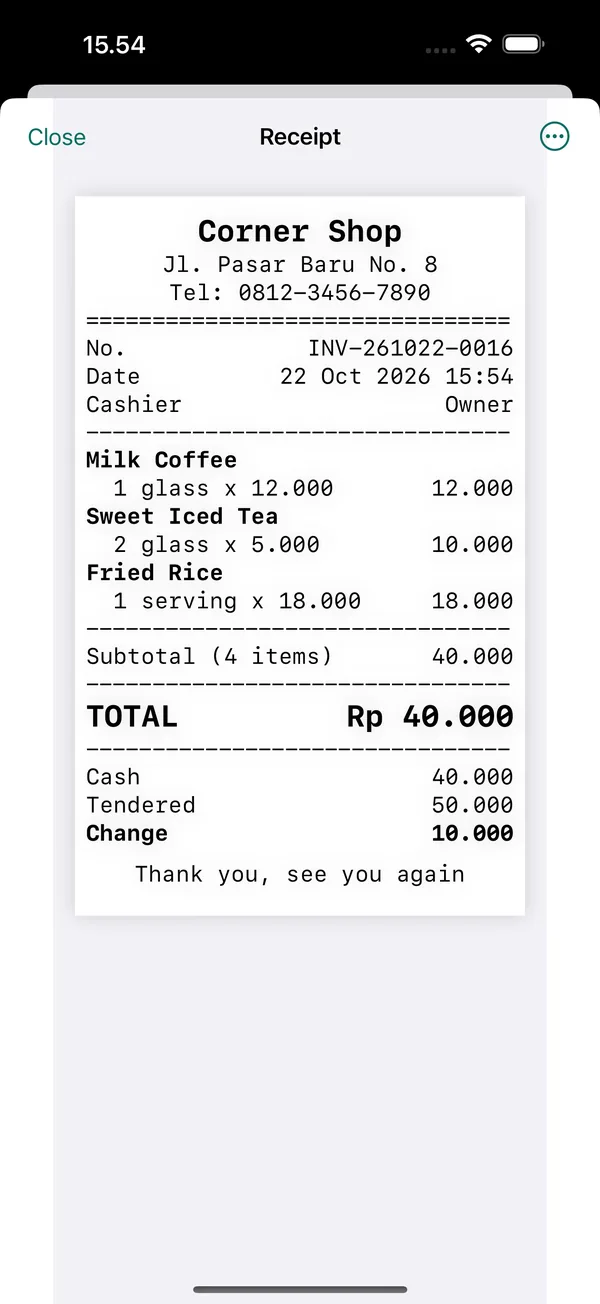
Open More › Receipt Layout to add a logo, address, and footer, and to set the font size. Fill the footer with something useful, such as your opening hours or exchange policy.
You can still print
Digital receipts do not fully replace a printer. Receipts can still be printed on a BLE (Bluetooth Low Energy) thermal printer connected in More › Printer & Cash Drawer, or via AirPrint from the View Receipt preview. Guidance on choosing a printer is in the Bluetooth thermal printer for iPhone article and the printer help.
When a paper receipt is still needed
Some situations still suit a paper receipt better: customers who do not use WhatsApp, customers in a hurry, or orders that need a slip stapled to the shopping bag.
Many shops use both. A simple flow at the counter:
- Once the total appears, ask: "Would you like the receipt printed, sent to WhatsApp, or no receipt?"
- If the customer picks WhatsApp and shops often, save their number as customer data, with their permission of course.
- Send the receipt, then make sure it has arrived before the customer leaves.
In cafés, paper receipts are also often used as order slips. If you run a café or food stall, see the café POS app guide too. For shops that often sell out of signal range, sales can still be recorded with an offline POS app, and the receipts sent once internet is available.
Frequently asked questions
How do I send a receipt to WhatsApp from iPhone?
In KasirPOS, once payment is done, tap Share Receipt, then choose WhatsApp and the customer's contact. For past sales, open the Transactions tab, choose the sale, then pick Share Receipt (Image), Share Receipt (PDF), or Send to WhatsApp if the customer's number is recorded. It works the same on iPhone and iPad.
Can I make receipts on iPhone without a printer?
Yes. A POS app on iPhone or iPad can create digital receipts and send them to the customer's WhatsApp as an image, PDF, or text. A printer is optional. If you need one later, KasirPOS can also print to a BLE thermal printer or via AirPrint from the receipt preview.
Do I need internet to send digital receipts?
Yes, but only when sending. In KasirPOS, sales can still be recorded on iPhone or iPad without internet. You can share the receipt later from the Transactions tab once you have a connection, for example over WhatsApp as an image or PDF. All sales data stays stored on your device.
Can a digital receipt be used as proof for returns or kasbon?
It can serve as proof of the sale between the shop and the customer, because it contains the same details as a paper receipt: date, receipt number, items, and total. To make matching easy, make sure the receipt number is shown and the sale is saved in the POS app. It is best to write your return policy in the receipt footer so customers know from the start.
How do I add my shop logo to digital receipts?
In KasirPOS for iPhone and iPad, open More, then Receipt Layout. There you can add a logo, address, and footer, and set the font size. Once set up, tap View Receipt on a sale to check the result before sending it to the customer.