KasirPOS
How to Collect Debts on WhatsApp Politely, Plus 8 Sample Messages
How to collect debts on WhatsApp without hurting the relationship: etiquette, when to send, 8 polite payment reminder messages, and sending details from iPhone.
How to collect debts on WhatsApp politely: send a private message at a reasonable hour, greet the customer by name, give clear details (sale number, date, and balance due), offer ways to pay, and close with a thank-you. A clear, friendly message makes it easy for customers to pay without feeling embarrassed.
Below you'll find collection etiquette, eight ready-to-use messages, and how to send debt details straight from an iPhone or iPad.
Why collect warung tabs on WhatsApp
In a warung (a small neighborhood shop), asking for payment in front of other shoppers often makes things awkward. The customer feels embarrassed and the shop owner feels uncomfortable. A WhatsApp message gives both of them some space.
There are other benefits too. The customer can read the details calmly, and there's a written record of when you sent a reminder.
You can also attach proof of the sale as a digital receipt, so there's no argument about the numbers. For this to work, the customer's WhatsApp number has to be saved from the start. Ask for it the first time you give them kasbon (store credit, or a customer tab).
Etiquette for collecting customer debt
- Send at a reasonable hour. Late morning or late afternoon. Avoid late at night, dawn, and rest hours.
- Send it privately. Don't ask for payment in a WhatsApp group, a status, or on social media. Mentioning someone's debt in public can embarrass them and damage the relationship.
- Use a respectful greeting. Bapak, Ibu, Mas, Mbak (common Indonesian honorifics), or whatever form of address you normally use at your shop.
- Make sure the details are right. Check the sale number, date, and balance due before you send. One wrong number can make the customer doubt all of your records.
- One message, then give it time. Don't send a string of messages. Wait two or three days before reminding them again.
- Be firm, but never threaten. A calm tone is more likely to get a reply.
- Offer a way out. Installments are often more realistic than waiting for full payment at once.
This guide covers polite ways to collect everyday store credit, not the legal side. For large debts or disputes, get advice from the proper authorities.
8 polite payment reminder messages
Replace the text in square brackets with the customer's details. Adjust the greeting and tone to match how you usually talk at your shop.
1. Friendly reminder before the due date
Good morning, [Name]. This is [shop name]. Just a quick reminder that the tab for sale [sale number] on [date], for [balance], is due on [due date]. Thank you for being a regular customer.
2. On the due date
Good afternoon, [Name]. The tab for sale [sale number] is due today, with [balance] remaining. You can pay at the shop, or by bank transfer or QRIS. Please let us know once it's done. Thank you.
3. Past the due date
Good afternoon, [Name]. Sorry to bother you. The tab for sale [sale number] on [date] still has [balance] remaining and is past its due date of [due date]. When do you think you'll be able to pay? We look forward to hearing from you.
4. Offering installments
Good afternoon, [Name]. We understand there are a lot of expenses right now. The remaining [balance] can be paid in installments, for example [installment amount] a week until it's paid off. If that works, the first installment could start on [date]. What do you think?
5. A long-time regular you know well
Bu [Name], how are you? Just a reminder that the tab from [date] still has [balance] left. No rush, you can settle it next time you drop by. Thank you, Bu.
6. Confirming an installment received
Thank you, [Name]. We received your installment of [installment amount] for sale [sale number] today. The remaining balance is now [balance]. Wishing you good health.
7. Final reminder, firm but polite
Good afternoon, [Name]. We've reminded you a few times about the tab for sale [sale number], with [balance] remaining. Please pay it off or start paying in installments by [date] at the latest. Until we receive a payment, we're sorry, but we can't give new store credit. Thank you for understanding.
8. Thank you after full payment
Thank you, [Name]. The tab for sale [sale number] is fully paid as of today. It's a pleasure serving you, and we look forward to your next visit to [shop name].
Customizing your WhatsApp payment reminder template
You can use the examples above as they are, but a message that feels personal is more likely to get a reply. Keep these points in mind:
- Keep it short. Three to five sentences is enough. Send the item details as an attached receipt instead.
- Check the name before sending. A message with the wrong name feels like a mass message.
- Mention how to pay. If you accept transfers or QRIS (Indonesia's standard QR payment), say so in the message so the customer doesn't have to ask.
- Local language is fine. If your customers usually speak a regional language, the message will feel more familiar.
- Save your templates in your phone's notes, so you only need to copy them and swap in the details.
How to collect debts on WhatsApp from KasirPOS on iPhone
An accurate reminder starts with tidy records. KasirPOS, a free iPhone POS app that also runs on iPad, records store credit automatically in the Debt Book, so you don't have to work out balances by hand.
First, see who needs a reminder
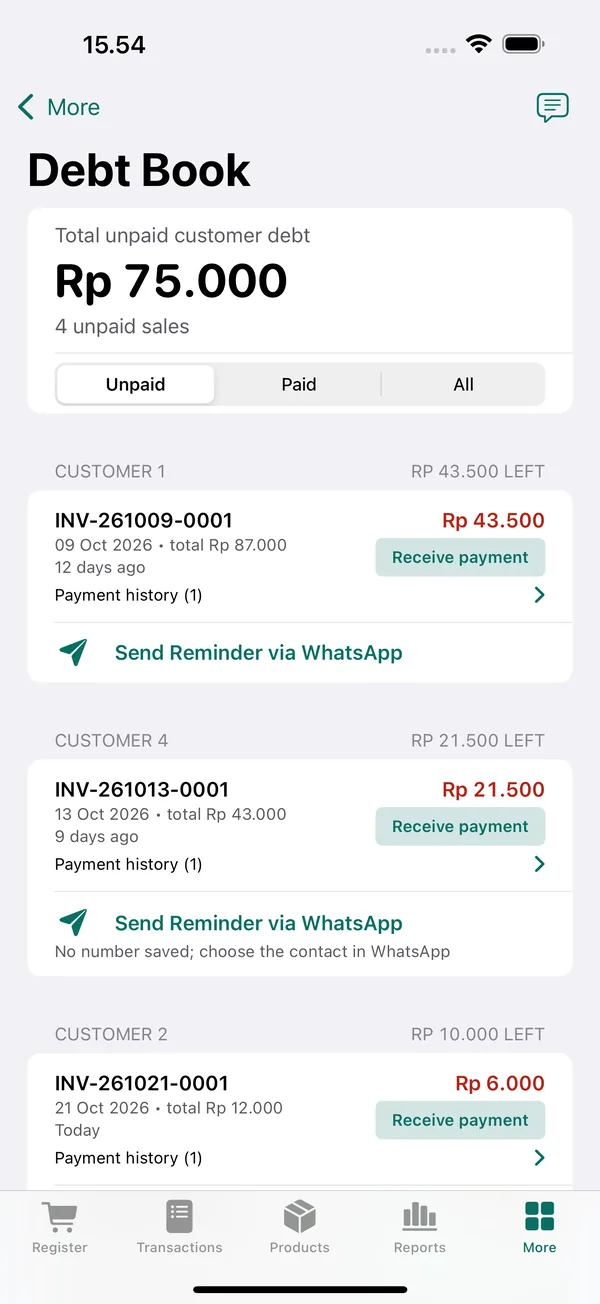
Open More › Customer Debt Book and choose the Unpaid filter. The total unpaid debt is shown at the top, and the list is grouped by customer.
Search for a customer name or sale number to see their balance and payment history.
Send a reminder straight from the Debt Book
Below the customer's name, tap Send Reminder via WhatsApp. If the customer's number is saved, WhatsApp opens with a message that already lists the sales and the balance due. Check it quickly, then send.
You can change the message with the Reminder Message button, for example to follow one of the samples above. The date the last reminder was sent is also recorded, so you know when you last reminded the customer and don't send too often.
After the customer pays
Record the payment in the Debt Book: find the customer's name, tap Receive payment, and enter the amount. You can also do this from the sale details with Receive Debt Payment. The balance and the payment history for each sale update right away.
If the customer pays by QRIS or bank transfer, make sure the money has actually reached the shop's account or QRIS before you record it. KasirPOS only records payments; it doesn't process them. Tips for matching them up are in the article on recording QRIS payments.
Once it's recorded, send a confirmation like sample 6 for an installment, or sample 8 if the tab is paid off.
If the customer doesn't reply
A message that's read but not answered is frustrating. Stay calm and follow a reasonable sequence:
- Wait two to three days, then send one more reminder in the same friendly tone.
- If you still hear nothing, talk to them in person next time they drop by, somewhere other shoppers can't overhear.
- Offer small installments. A little at a time is better than nothing.
- Send a final reminder like sample 7, and stop giving new store credit until a payment comes in.
Going forward, prevent the same problem with clear store credit rules: a maximum amount, a due date, and who is allowed to give credit. The guide is in the article on how to track customer debt.
Frequently asked questions
What's a polite way to ask for payment on WhatsApp?
Start with a greeting and the customer's name, clearly state the sale number, date, and balance due, then ask when they can pay or offer installments. Close with a thank-you. Avoid words that blame or threaten, and send it as a private message, not in a group.
What time should I send a payment reminder on WhatsApp?
Late morning or late afternoon is usually a reasonable time. Avoid late at night, dawn, and rest hours. If you know when the customer gets paid, send the reminder shortly before that date so they have a chance to set money aside for you.
Is it OK to ask for payment in a WhatsApp group?
Better not. Mentioning someone's debt in a group, a status, or on social media can embarrass the customer and damage their relationship with your shop. Send a private message with clear details and a polite tone.
How do I send a customer's debt details from my iPhone?
Record store credit in a POS app that has a debt book, so balances are always calculated for you. In KasirPOS for iPhone and iPad, open More › Customer Debt Book to see each customer's sales and balance, then send the details to the customer's WhatsApp along with a polite reminder message.