KasirPOS
How to Track Customer Debt at Your Shop So Store Credit Stays Organized
How to track customer debt at a small shop: what to record, store credit rules, a sample ledger, and a free digital credit book on iPhone and iPad.
How to track customer debt properly: record every kasbon (store credit, or a customer tab) on the spot with the customer's name, WhatsApp number, date, sale number, items, total, and balance. Record each installment as a new payment instead of crossing out the old number. With a digital credit book on an iPhone or iPad, balances are calculated automatically.
This guide is for warungs (small neighborhood shops) and toko kelontong (corner grocery stores) that already give store credit but are starting to struggle with the records.
Store credit at the warung: helping customers, protecting the shop's money
Kasbon is part of everyday life at a warung. Regular customers take rice or cooking gas now and pay on payday or after the harvest. The habit builds trust and keeps customers coming back.
The problem is that every tab is shop money that's tied up. The goods are gone and the capital has been spent, but the money hasn't come in yet.
If the records are messy, a warung can look profitable on paper but not have enough cash to restock. How profit and cash relate is explained in the article on how to calculate shop profit.
Problems with a paper debt book
A notebook is cheap and easy. But a few problems come up again and again:
- Lost or damaged. The book gets wet, stained with cooking oil, or misplaced.
- Unreadable handwriting. Especially when the owner, their kids, and staff all take turns writing in it.
- Different memories. The customer feels they've already paid, the record says otherwise, and there's no proof of who's right.
- Calculation mistakes. Numbers get crossed out and written over, then balances are recalculated by hand.
- No visible total. It's hard to answer a simple question: how much of the shop's money is still with customers?
All of these problems can be reduced with two things: complete records, and proof you can show the customer.
What every customer tab record should include
Whatever you use, a notebook or an app, each tab should record the following:
- Customer name with a clear identifier, for example "Bu Sri RT 03" (Mrs. Sri, neighborhood unit 3), not just "Sri".
- WhatsApp number for sending details and reminders.
- Date of the tab.
- Sale number so each debt can be traced.
- Items and quantities.
- Purchase total and the amount already paid at the time.
- Installments: the date and amount of each payment.
- Balance after each payment.
- Due date: when the debt was agreed to be paid off.
Sample tab record for one customer
Here's an example record for Bu Sri during October. Installments are written as new rows, and the balance column is always calculated from the row before.
| Date | Description | Sale no. | New debt | Paid | Total balance |
|---|---|---|---|---|---|
| Oct 3 | Rice 5 kg, cooking oil 2 liters | INV-261003-0008 | Rp 112.000 | Rp 0 | Rp 112.000 |
| Oct 10 | Installment | INV-261003-0008 | - | Rp 50.000 | Rp 62.000 |
| Oct 12 | Sugar 1 kg, eggs 1 kg (purchase Rp 48.000, paid at the counter Rp 20.000) | INV-261012-0021 | Rp 28.000 | - | Rp 90.000 |
| Oct 25 | Paid off the Oct 3 sale | INV-261003-0008 | - | Rp 62.000 | Rp 28.000 |
At the end of the month, Bu Sri's balance is Rp 28.000, all from the October 12 sale. If the due date is 14 days from the sale date, the October 3 sale should have been paid off by October 17. It was paid 8 days late, and the record shows that clearly.
Store credit rules that are fair to everyone
Tidy records are only half the job. The other half is clear rules from the start, so you don't have to decide case by case based on feelings.
- A maximum per customer. Pick an amount your capital can safely handle, for example one week's worth of shopping. Once the limit is reached, new credit waits until part of the debt is paid.
- A standard due date. For example 14 days from the sale date, or every payday. One rule for everyone is easier to remember and check than different dates for each person.
- Who can give credit. For example only the owner, or specific staff for registered customers.
- New customers. Consider giving credit only to customers who have shopped a few times and whose number is saved.
- Proof for the customer. Send the sale details every time there's a new tab or an installment, so your records and the customer's match.
Share these rules in a friendly way, for example with a small sign near the counter. Rules that apply to everyone are easier to accept than decisions that keep changing.
How to track customer debt in KasirPOS (iPhone/iPad)
KasirPOS is a free iPhone POS app that also runs on iPad, with a Debt Book that fills itself from your sales. You don't need to copy tabs into a separate book.
1. Save customer details
Add customers in More › Customers & Members. Enter a clear name along with their WhatsApp number.
2. Record the tab during the sale
Add items to the cart as usual and choose the customer. On the Payment screen, enter the amount actually paid at the time, for example Rp 20.000 of a Rp 48.000 total.
The rest, Rp 28.000, is automatically recorded in the Debt Book under that customer's name. If no customer is selected, the app asks you to choose one first.
3. Receive installments
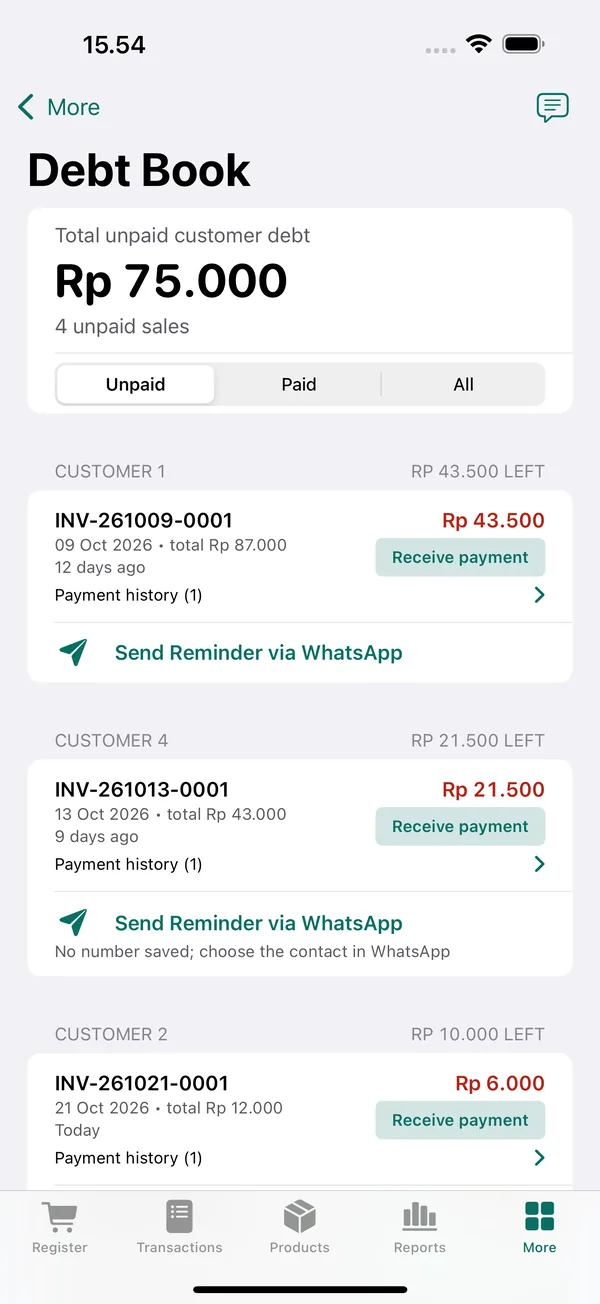
Open More › Customer Debt Book, find the customer's name, tap Receive payment, and enter the amount. Installments can also be recorded from the sale details with Receive Debt Payment.
4. Search and check the history
In the Debt Book, use the Unpaid, Paid, or All filter. Search by customer name or sale number.
Every sale has a payment history. So when a customer says "I already paid yesterday," you can look up the date and amount together.
5. See total debt
The total unpaid debt is shown at the top of the Debt Book. The Reports tab also shows New customer debt for the selected period.
For example, a 7-day report for a sample shop shows sales of Rp 5.737.500 with new customer debt of Rp 65.250. This tells you how much of your sales is still on credit.
6. Send proof to the customer
After a credit sale, open it in the Transactions tab and tap Send to WhatsApp. The customer then has the same record you do. The steps are explained in the article on digital receipts via WhatsApp.
When it's time to collect, tap Send Reminder via WhatsApp below the customer's name in the Debt Book. The message already lists the sales and the balance due, and you can change it with the Reminder Message button.
Sample polite reminder messages are in the article on how to collect debts on WhatsApp.
Small habits that keep store credit under control
- Check total debt once a week. If it keeps rising, tighten your credit rules for a while.
- Record installments right away. Don't wait until evening, because that's where discrepancies often creep in.
- Remind before the due date. A friendly message two or three days ahead feels better than chasing a late payment.
- Limit new credit for customers who haven't started paying off old debts.
- Back up your data regularly. A digital debt book can be lost too if your phone is lost. Follow the guide to backing up POS data and keep a copy somewhere other than your phone.
Well-kept credit records let you keep helping customers without sacrificing your shop's capital.
Frequently asked questions
How do I track customer debt on my phone?
Use a POS app that has a debt book, so tabs are recorded straight from your sales. In KasirPOS for iPhone and iPad, choose the customer, enter the amount paid, and the rest goes into the Debt Book automatically. Installments are recorded with Receive payment, and the balance updates right away.
What should a store credit book contain?
A good credit book records the customer's name, WhatsApp number, date, sale number, items, purchase total, amount already paid, each installment, the balance, and the due date. Write installments as new rows instead of crossing out old numbers, so the history can be traced at any time.
Is there a free debt tracking app for iPhone?
Yes. KasirPOS is free for iPhone and iPad, with no ads and no subscription. Its Debt Book fills in automatically when a customer underpays, accepts installments, can be searched by name or sale number, and shows the total unpaid debt. The app works without internet and without signing up for an account.
Does customer debt count as profit?
Credit sales still count as sales, but you haven't received the money yet. So watch two numbers at once: profit and the cash that actually comes in. If customer debt keeps rising, a warung can look profitable in its reports but not have enough cash to restock.