POS app for iPhone and iPad

Tidy shop, peace of mind.

KasirPOS records sales, stock, and customer debts right on your phone or iPad. Every feature is free, there are no ads, and it keeps working even when the internet is down.

iPhone and iPad with iOS 17 or later. No account sign-up.

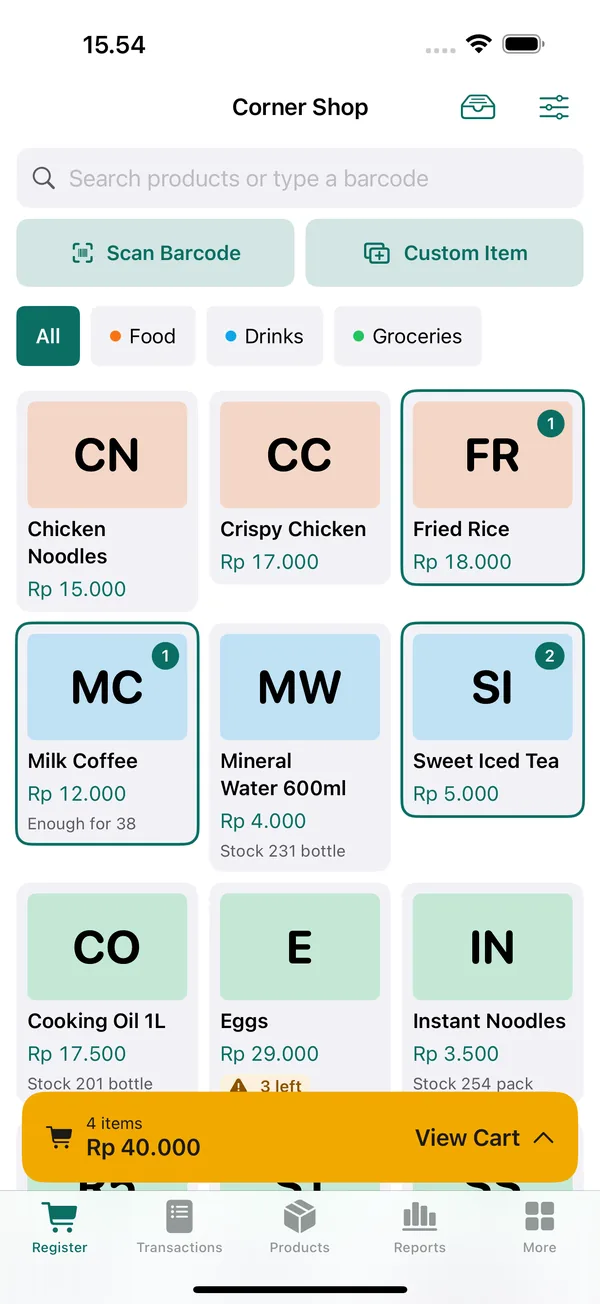
KasirPOS Register screen: products such as Chicken Noodles, Fried Rice, Milk Coffee, and Mineral Water 600ml, with a cart of 4 items worth Rp 40.000.
  • Every feature freeNo ads, no subscription, no in-app purchases.
  • Works offlineSales are still recorded when the signal drops.
  • No accountEnter your shop name and start selling.
  • Data on your deviceNever sent to our servers. Automatic backup every day.
Register

From tapping a product to sending the receipt

The register screen is built to be used hundreds of times a day while you serve a line of customers. The buttons are always in the same place.

  1. Register screen with a product grid and the Scan Barcode and Custom Item buttons.
    1

    Tap a product

    The product goes straight into the cart. Scan barcodes with the camera or a Bluetooth/USB scanner. Item not entered yet? Use Custom Item.

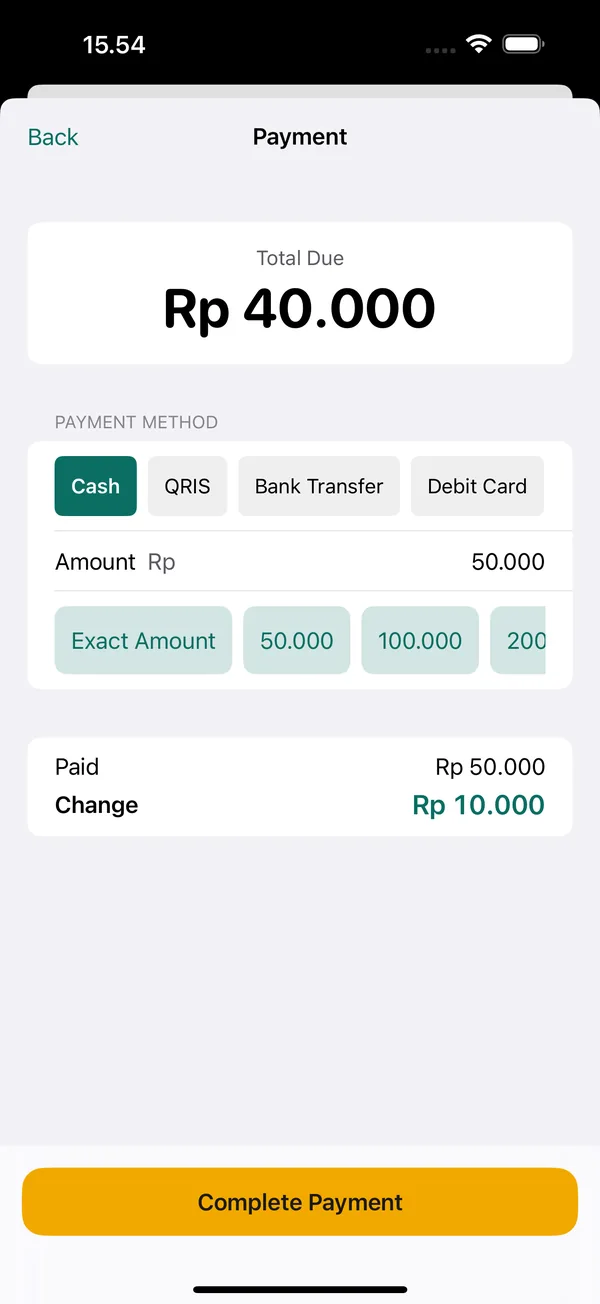
  2. Payment screen: total due Rp 40.000, payment methods Cash, QRIS, Bank Transfer, and Debit Card, Rp 50.000 paid and Rp 10.000 change.
    2

    Take payment

    Cash, QRIS, bank transfer, card, e-wallet, or a mix. Exact-amount and quick-amount buttons; change is calculated automatically.

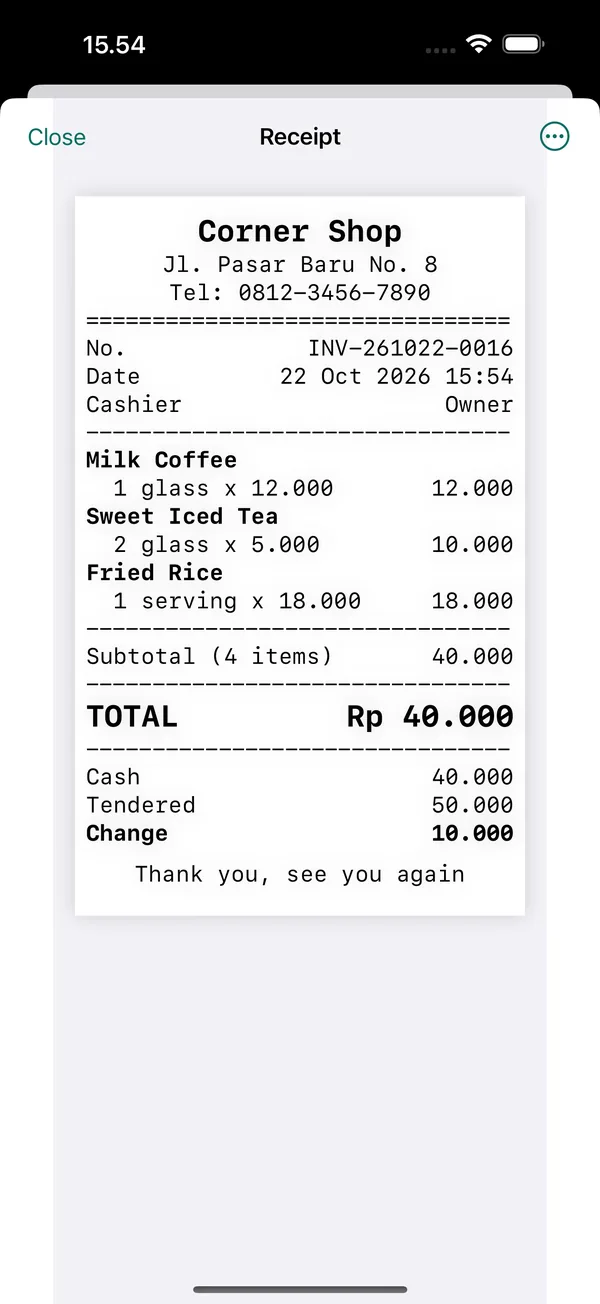
  3. Receipt preview for Corner Shop with Milk Coffee, Sweet Iced Tea, and Fried Rice, totaling Rp 40.000.
    3

    Print or send the receipt

    Print to a Bluetooth thermal printer, or send it as an image or PDF to the customer's WhatsApp.

Debt Book

Store credit on record, in a book that can't get lost.

When a customer pays short, the rest automatically goes into the Debt Book under the customer's name. The total still unpaid is always shown at the top.

  • Filter by unpaid, paid, or all
  • Search by customer name or sale number
  • Take installments and see the payment history for each sale
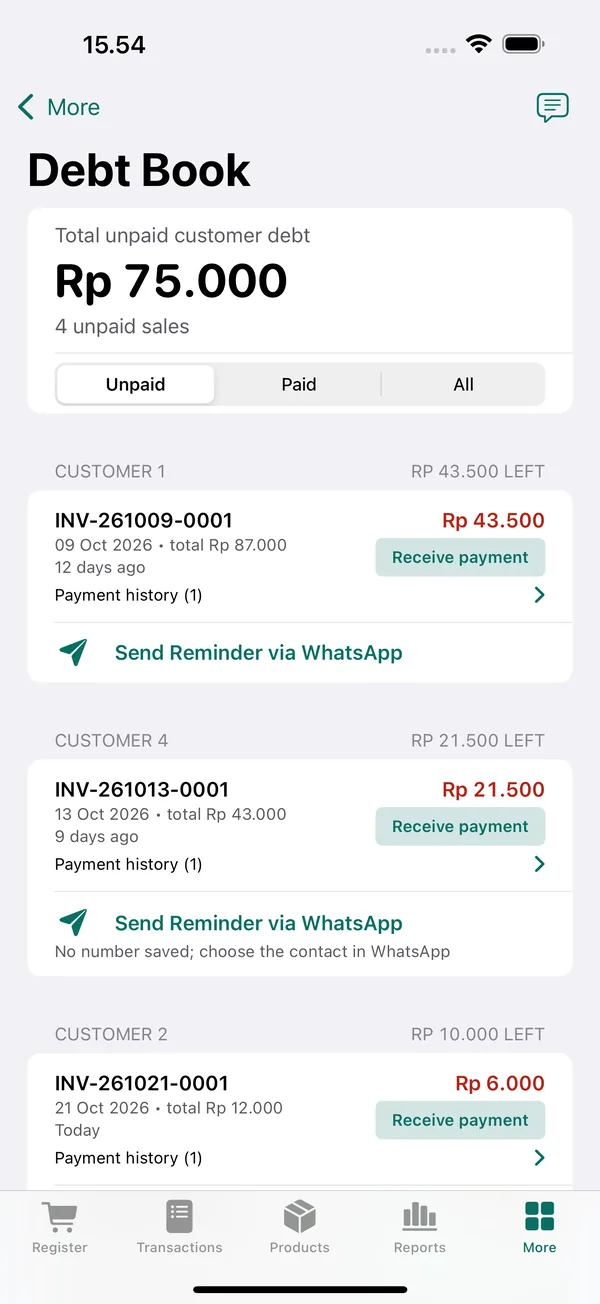
Debt Book screen: Rp 75.000 in unpaid customer debt across 4 unpaid sales, grouped by customer, with Receive payment and Send Reminder via WhatsApp buttons.
Stock and purchases

The stock in the app matches the stock on the shelf.

Every item coming in and going out is recorded in a history: sales, purchases, stock counts, and returns. If numbers don't match, you can trace where the difference came from.

Opening120
In48
Out35
Closing133
  • Record purchases from suppliers; the average cost price is recalculated automatically
  • Stock counts and low stock alerts
  • Automatic wholesale prices and extra units (box, pack) with their own barcodes
  • Import hundreds of products at once from Excel or CSV
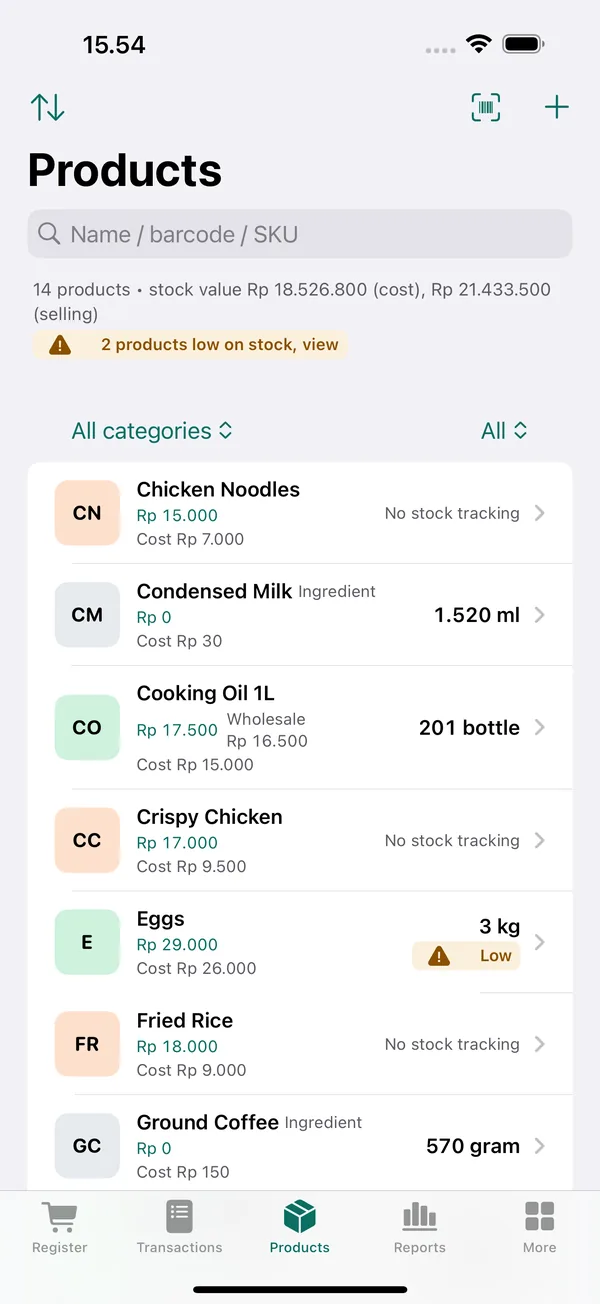
Products screen: product list with selling price, wholesale price, cost price, and remaining stock such as 201 bottles and 1.520 ml, with a warning that 2 products are low on stock.
Reports

Know your profit, not just your sales.

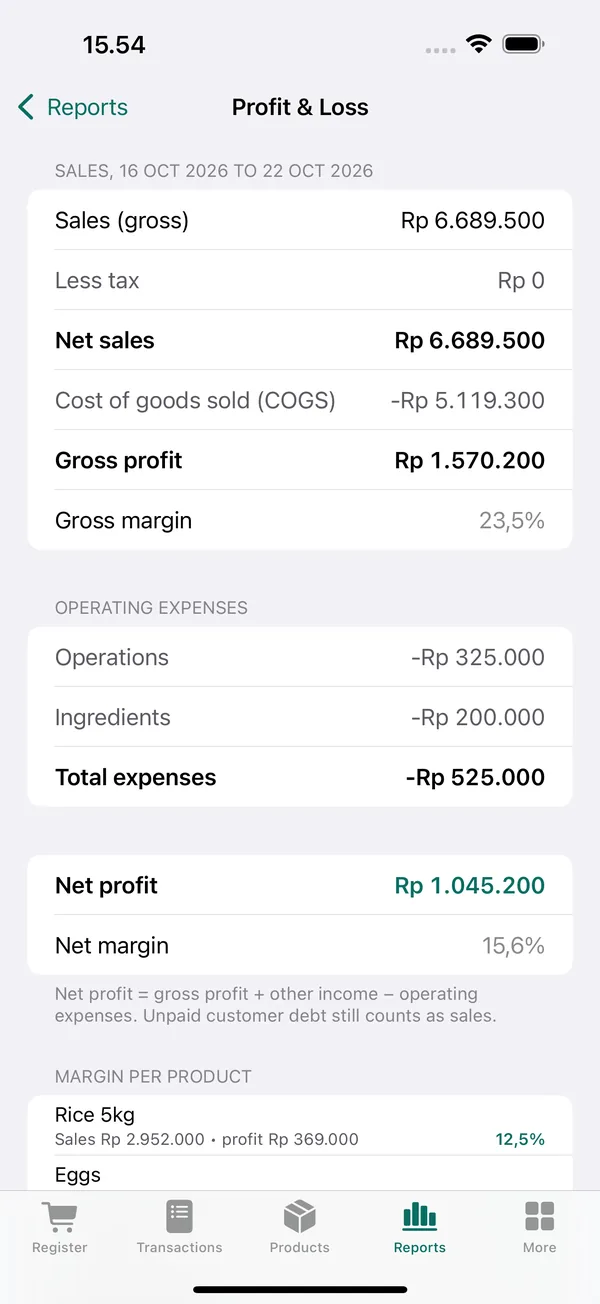
Sales, gross profit, and net profit are calculated from every transaction. A full profit and loss report with operating expenses and margin per product, without tallying it up by hand in a notebook.

  • Daily, weekly, or monthly, with a chart of sales and profit per day
  • Best-selling products; sales by category, cashier, payment method, and customer
  • Record expenses and other income
  • Export to Excel (.xlsx)
Profit & Loss screen: net sales Rp 6.689.500, gross profit Rp 1.570.200, total expenses Rp 525.000, and net profit Rp 1.045.200 with a 15.6% net margin.
WhatsApp Catalog

Send your price list to customers on WhatsApp.

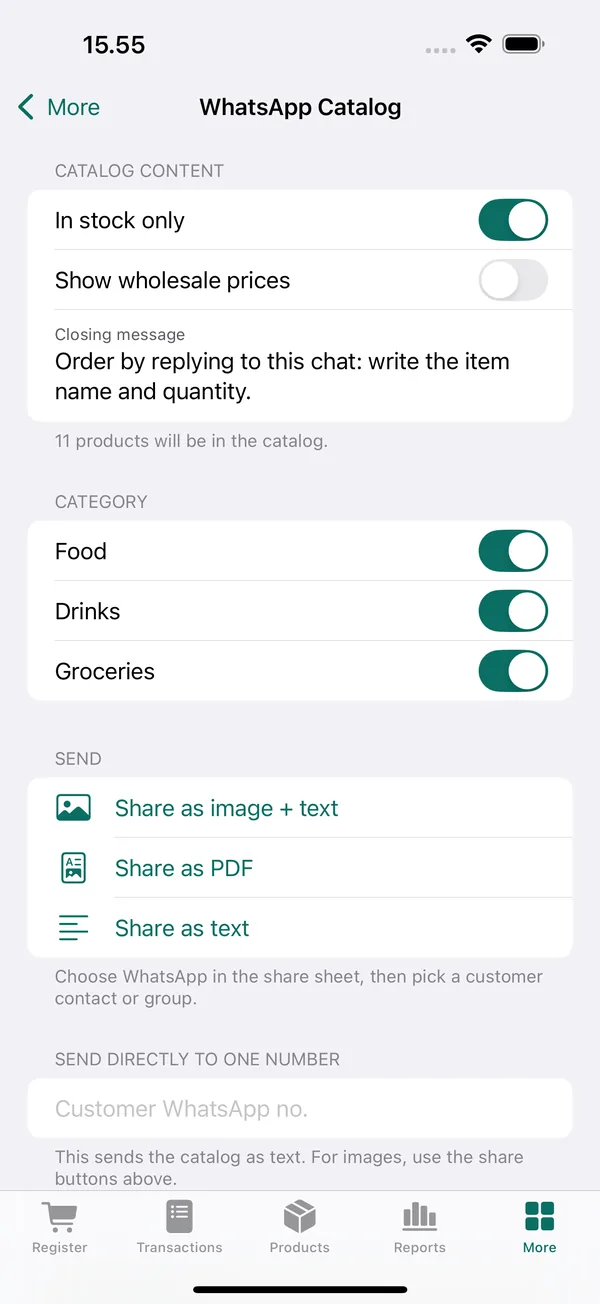
Pick the categories to send, then share them as an image, PDF, or text. Customers simply reply to the chat with the item name and quantity.

  • Option to show only products that are in stock
  • Option to show wholesale prices
  • Send to a customer group or straight to one number
WhatsApp Catalog screen: catalog content options In stock only and Show wholesale prices, the Food, Drinks, and Groceries categories, and buttons to share as image + text, PDF, or text.
Staff

Cashiers use their own PIN. Costs and profit stay private.

Create an account for each cashier with their own permissions. Every transaction records the cashier's name. The owner can always see every report.

  • Set permissions per cashier: view cost and profit, give discounts, void transactions, and more
  • Forgot the owner PIN? Unlock with Face ID, Touch ID, or the device passcode
  • The owner can reset a cashier's PIN
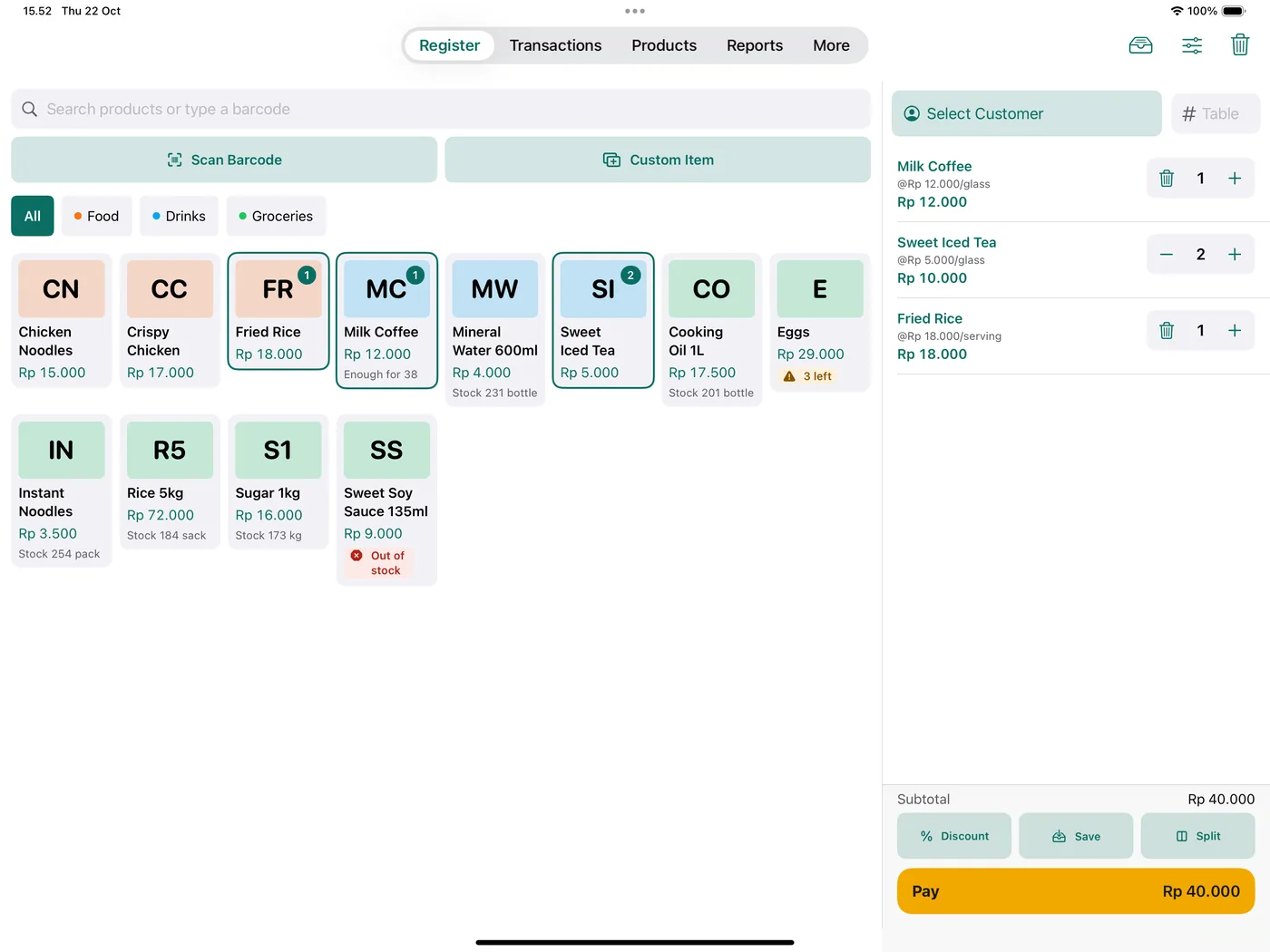
KasirPOS on iPad: product grid on the left and the cart with Milk Coffee, Sweet Iced Tea, and Fried Rice and a Pay Rp 40.000 button on the right.
iPad

On iPad, products and cart on one screen.

Set the iPad on the counter and use a hardware keyboard or a barcode scanner. Table orders can be held to pay later, and bills can be split.

  • Cmd + F Search products
  • Cmd + B Scan barcode
  • Cmd + M Custom item
  • Cmd + Return Pay
All features

What a small shop needs, with nothing locked behind a paid version.

Register

  • Tap products, change quantity with + and −
  • Scan barcodes with the camera, a Bluetooth scanner, or USB
  • Custom items for goods or services not yet entered
  • Discounts per item and per sale
  • Hold orders per table and split bills
  • Options and toppings with extra charges
  • Tax, service charge, and rounding

Payments

  • Cash, QRIS, bank transfer, card, e-wallet
  • Several methods combined in one sale
  • Suggested cash amounts and automatic change
  • Short payments recorded as customer debt

Receipts

  • Bluetooth LE thermal printers, 58 or 80 mm paper
  • Share as an image, PDF, or straight to WhatsApp
  • Logo, address, footer note, and font size
  • Open a cash drawer connected to the printer

Stock and purchases

  • Stock history per product, stock counts, low stock
  • Daily reminder when stock runs low
  • Supplier purchases, including unpaid ones
  • Product variants, product photos, barcode creation
  • Import from Excel or CSV with a template

Reports

  • Sales, gross profit, and net profit
  • Profit and loss with margin per product
  • Best sellers, by category, cashier, customer
  • Export to Excel (.xlsx)
  • Today's sales widget on the Home Screen

Customers and members

  • Customer records and debt book
  • Send debt reminders to WhatsApp
  • Special wholesale prices
  • Member points program, redeemable at checkout
  • Price catalog to WhatsApp

Transactions

  • Edit transactions, including the date
  • Void transactions; stock and points are restored
  • Cashier name recorded on every transaction
  • Open and close the register with a cash drawer count

Staff and security

  • Cashier accounts with their own PINs and permissions
  • Lock the app with Face ID or Touch ID
  • Owner PIN recovery with the device passcode

Your data

  • Daily automatic backup in the Files app
  • Manual backup and restore at any time
  • Optional iCloud sync for iPhone and iPad
  • No account, no servers of ours
Why KasirPOS

Built from the complaints of POS app users.

Before building KasirPOS, we read reviews of other POS apps on the App Store and Play Store. These are the complaints that came up most often, and how KasirPOS handles them.

“The checkout screen is slow and clunky.”

A product grid, one tap to add to the cart, + and − buttons in the cart. Clearly labeled Scan Barcode and Custom Item buttons.

“The stock in the report doesn't match the count on the shelf.”

Every stock change is recorded. The stock report shows opening + in − out = closing. If something doesn't match, Check & Fix Stock recalculates it from the history.

“Barcode scanning keeps getting stuck.”

The camera keeps scanning until you close it, so you don't need to reopen it for each item. A Bluetooth or USB scanner works right away in the search field.

“Receipts fail to send to customers.”

Receipts can be shared as an image or PDF, or sent straight to the customer's WhatsApp number.

“Profit is hidden from cashiers, and the owner can't see it either.”

Permissions are set per cashier account. The owner account always sees everything.

“Forgot my PIN, and my data is locked.”

The owner unlocks the app with Face ID, Touch ID, or the device passcode, then creates a new PIN. Cashier PINs can be reset by the owner.

“I need wholesale prices and to sell by the box.”

Wholesale prices set manually or applied automatically by quantity, plus extra units such as box or pack with their own price and barcode.

“Something went wrong, but support can't be reached.”

The More menu has a Chat with Support on WhatsApp button. The app version is sent along so support can help faster.

Hardware

Use the phone you already have. The printer can come later.

KasirPOS only needs an iPhone or iPad. Without a printer, receipts can still be sent as an image or PDF.

iPhone and iPad

iOS or iPadOS 17 or later. On iPad, products and cart appear side by side.

Receipt printer

Bluetooth Low Energy (BLE) thermal printer with ESC/POS commands, 58 or 80 mm paper.

Barcode scanner

The iPhone or iPad camera, or a Bluetooth or USB scanner that types straight into the search field.

Cash drawer

A drawer connected to the receipt printer can be opened from the app.

Before buying a printer: make sure it supports Bluetooth Low Energy (BLE). Printers with only classic Bluetooth can't connect to iPhone and iPad; this is an iOS limitation, not the app's. We haven't tried every brand, so run a Test Print after connecting.

Video

See how it works in 30 seconds.

  • No pile-up at the counter

    Tap products, and the change shows up on its own.

  • Stock that matches the shelf

    Every item in and out is recorded.

  • Store credit never gets lost

    Short payments go into the Debt Book automatically.

  • Know your profit every day

    Sales, profit, and profit and loss reports.

  • Keeps working without internet

    The signal drops, the register keeps going.

  • Neat receipts

    Print them, or send them to WhatsApp.

  • Staff mind the shop

    Costs and profit stay private.

Your data

Your shop data stays in your hands.

  • No account and no servers of ours. Data is stored on your iPhone or iPad.
  • Want to use it on iPhone and iPad together? Turn on iCloud sync; the data is stored in your own iCloud.
  • Automatic backup every day, with the last 7 days kept in the Files app.
  • Manual backup at any time, saved wherever you choose.
  • Changing phones? Make a backup on the old device, then restore it on the new one.

Read the privacy policy

App Store privacy label

Data Not Collected

The developer does not collect any data from this app.

Ads
None
Analytics and tracking
None
User account
Not needed
Where data is stored
Your device and iCloud
FAQ

Frequently asked questions

Is KasirPOS really free?

Yes. Every feature can be used without paying. There are no ads, no subscriptions, and no in-app purchases.

Is there an Android version?

No. KasirPOS is currently only available for iPhone and iPad with iOS or iPadOS 17 or later.

Is the app available in English?

Yes. KasirPOS is available in English and Indonesian and follows the language of your iPhone or iPad. The App Store page also follows your device or browser language, so it may sometimes appear in Indonesian under the name KasirPOS: Kasir dan Stok. It's the same app; the English listing is at this link.

What kind of business is it for?

For businesses with a single checkout counter: warungs (small neighborhood shops), corner shops, staple-goods shops, retail stores, food stalls, and small cafés. Shops get wholesale prices and box or pack units, while food stalls and cafés get open bills, split bills, and toppings.

When is KasirPOS not a good fit?

If you need an Android or web version, an online dashboard to monitor your shop remotely, or management of several branches at once. KasirPOS also doesn't process payments; QRIS or bank transfer money still goes into your shop's own account.

Does it need internet?

No. Transactions, stock, and reports are stored on the device, so the register keeps working when the signal drops. The internet is only used when you send a receipt or catalog via WhatsApp.

Does KasirPOS process QRIS payments?

No. KasirPOS records how the customer paid (cash, QRIS, bank transfer, card, e-wallet). The money still comes in through your own QRIS or shop bank account, not through the app.

Which printers can I use?

Bluetooth Low Energy (BLE) thermal printers that use ESC/POS commands, with 58 or 80 mm paper. Printers that only support classic Bluetooth can't connect to iPhone and iPad.

We haven't tried every brand, so run a Test Print after connecting in More › Printer & Cash Drawer. Without a printer, receipts can still be sent as an image or PDF.

Can several cashiers use it?

Yes. Create cashier accounts with their own PINs and permissions, and each cashier signs in with their own PIN. Cashiers can share one device, or each use their own device through iCloud sync.

Can I use it on iPhone and iPad at the same time?

Yes, with iCloud sync. On the main device, turn on More › Backup & Restore › iCloud Sync. On the second device with the same Apple ID, install KasirPOS and choose Get data from iCloud on the welcome screen.

Data is stored in the iCloud of your Apple ID, not on our servers. Sync stays off until you turn it on.

What if I change phones?

On the old phone, open More › Backup & Restore and make a backup. Send the backup file to the new phone (for example with AirDrop or iCloud Drive), then choose Restore there. Also keep a manual backup somewhere else regularly, so your data is safe if your phone is lost or damaged. If iCloud sync is on, just choose Get data from iCloud on the new phone with the same Apple ID.

Can I add many products at once?

Yes. In the Products tab choose Add › Bulk Import, download the Excel template, fill it in, then import the .xlsx or .csv file.

Can a product have unlimited stock?

Yes. In Edit Product, turn off Track stock. That product can then be sold without a stock limit, and its stock doesn't go down when sold. Handy for services or menu items you make yourself.

Where can I get help?

Chat with support on WhatsApp at +62 896-9362-6163, or from the app in More › Chat with Support on WhatsApp. The full guide is on the Support page.

Start recording sales today.

Download KasirPOS, enter your shop name, and you can record your first sale right away. Sample products are included for practice.

Download on the App Store