KasirPOS
Offline POS App on iPhone: Keep Selling When the Signal Drops
An offline POS app keeps working when the signal drops at the market or shophouse. How it differs from cloud POS, which needs internet, and how to back up.
An offline POS app stores data on your phone or tablet, so transactions, stock, and receipts keep working even when the signal drops or your mobile data runs out. The upside is that it is fast, private, and does not depend on a server. The downside is that you cannot monitor the shop remotely and you must make your own backups regularly.
Many POS apps ask you to sign up for an account and stay connected to the internet. Here is how to judge whether an offline register suits your shop better, especially if you use an iPhone or iPad.
Why an offline POS app matters for small shops
The register is the one part of the shop that must never stop. Unfortunately, internet is often unreliable exactly where small businesses sell.
- Lost signal. Inside markets, packed shophouse rows, basements, or upper floors of buildings, the signal often comes and goes.
- Data runs out or Wi-Fi goes down. This happens often at the end of the month, or during a power cut when the router goes off too.
- Service outages. With apps that depend on a server, the register can stall when the provider's server has problems, even if your internet is fine.
- The line will not wait. Customers do not care about the signal. If the register freezes for a minute during a rush, some of them will leave.
A POS app that works without internet removes all of these risks from the counter. Every tap is processed on the device right away, without waiting for a reply from a server.
Offline vs cloud-based POS apps: an honest comparison
Cloud-based apps store data on the provider's server, so it can be opened from many devices. Offline apps store data on your device. Both have their place.
| Aspect | Offline POS (data on the device) | Cloud-based POS |
|---|---|---|
| When the internet is down | Keeps working as usual | Depends on the app; some are limited, some stop |
| Speed | Fast, no waiting for a server | Depends on signal quality |
| Remote monitoring | Not possible directly | Possible from another phone or a browser |
| Multiple devices and branches | Limited | Data can be shared across many devices and outlets |
| Account | Usually no login | Sign-up and login required |
| Privacy | Data stays on your device | Data is stored on the provider's server |
| Cost | Some are fully free | Many are subscription-based |
| Backups | Your own responsibility | Partly handled by the provider |
When cloud is a better fit
If you are rarely at the shop and want to see sales from home, have several branches, or several cashiers need to see the same stock on different devices at the same time, a cloud-based app fits better.
When offline is a better fit
If your shop has one counter, the owner is often on site, the signal is unstable, and you want your data to stay private with no monthly fee, an offline register makes more sense. If you are still weighing a dedicated device against an app, also read the comparison cash register vs POS app for small shops.
What still needs internet
Offline does not mean never using the internet. A few things still need it:
- Sending receipts or the catalog via WhatsApp. Receipts can be created without internet, but sending them via WhatsApp needs a signal. Receipts printed on a Bluetooth printer do not need internet. How digital receipts via WhatsApp work is covered separately.
- QRIS and bank transfer payments. The payment happens in the customer's banking or e-wallet app, and you need internet to confirm the money has really arrived. QRIS is Indonesia's standard QR payment code. The POS app only records the payment method. See also recording QRIS payments.
- Downloading and updating the app from the App Store.
- Saving backups to iCloud Drive. Backup files only upload to iCloud when there is internet. AirDrop to a Mac does not need internet.
iCloud sync, if you turn it on. KasirPOS has optional iCloud sync for using the same data on iPhone and iPad, and this feature uses the internet to send data changes to your own iCloud. Data on the other device only updates once that device is connected to the internet.
Offline POS on iPhone with KasirPOS
KasirPOS is a free POS and inventory app for iPhone and iPad, built to run without internet. No ads, no subscription, and no in-app purchases.
- No login. Download it, enter your shop name, then tap Save & Open Register. There is no email or password to create.
- Core features work offline. Transactions, stock, the Debt Book, profit reports, and receipt printing over a Bluetooth printer keep working without internet.
- Data on the device. Your shop data is stored on your iPhone or iPad, not sent to our servers.
- Locked access. The app can be locked with Face ID or Touch ID, and each cashier logs in with their own PIN.
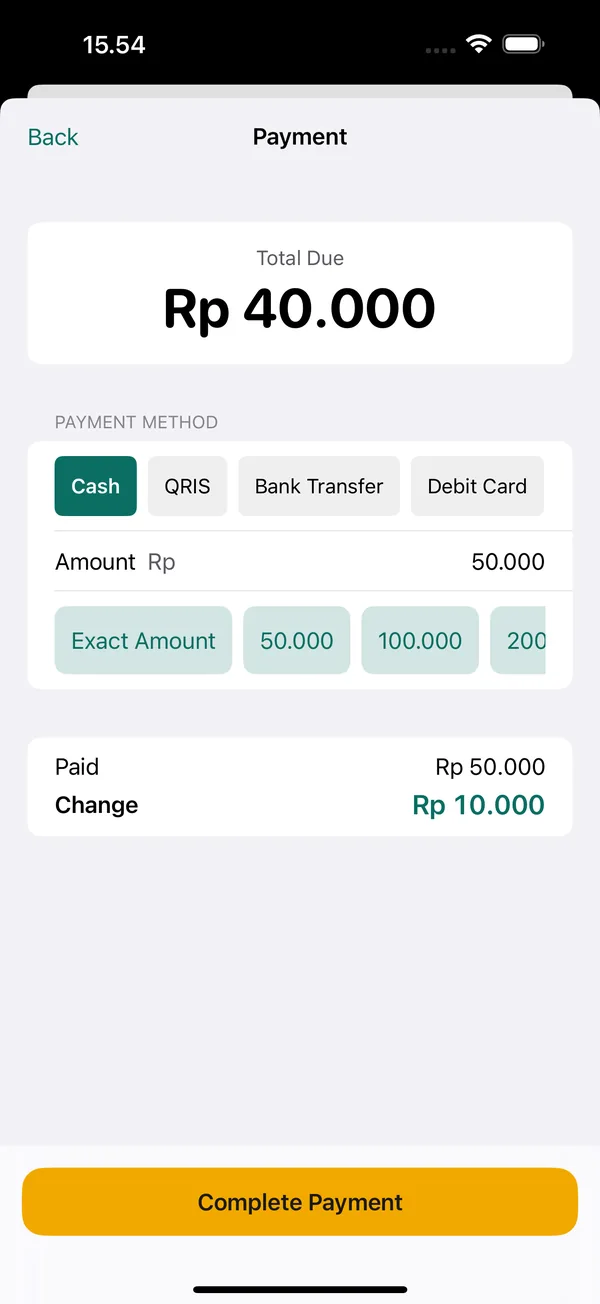
To prove it yourself: turn on Airplane Mode on your iPhone, open KasirPOS, then complete one transaction. Other criteria for choosing an app are covered in the iPhone POS app guide.
Backup discipline: the duty of every offline POS user
Because data is stored on the device, a phone that is lost, broken, or water-damaged can take your sales records and customer debts with it. Backups are the price you pay for speed and privacy.
KasirPOS has two layers of backup:
- Automatic backups. Made every day, with the last 7 days kept in the Files app, in the folder On My iPhone › Kasir Pos › Backup Otomatis. Because they are on the same device, these backups do not help if the phone is lost or broken.
- Manual backups. Open More › Backup & Restore › Back Up Now. Save the
.kasirbackupfile off the device: iCloud Drive, send it to yourself, or AirDrop it to a Mac.
A backup routine that is easy to remember
- Once a week, for example every Sunday night, make a manual backup.
- After big jobs, such as adding lots of products or doing a stock take, make another backup without waiting for the weekend.
- Move the file off the iPhone the same day, for example to iCloud Drive or a WhatsApp chat with yourself.
- Before changing phones, make a backup on the old phone and confirm the restore on the new phone worked before the old phone is sold or reset.
The full guide is in the POS app data backup article and on the support page about data.
Important: Restoring replaces all data on the destination device. Do not try a restore on the iPhone you are selling with unless you really want its data replaced.
Privacy: your sales data stays in your hands
Shop data holds sensitive things: daily sales, cost prices, margins, and who owes you money. With cloud-based apps, that data is stored on the service provider's server.
KasirPOS stores data on your iPhone or iPad. Its privacy label on the App Store is "Data Not Collected", which means the developer does not collect data from this app. You can check this yourself in the app privacy section on the App Store page before downloading.
If iCloud sync is turned on, the data is stored in your own iCloud linked to your Apple ID, not on our servers.
Privacy also means controlling who can see what inside the shop. Create cashier accounts without the "View cost & profit" permission so staff can keep selling without seeing the shop's profit.
Frequently asked questions
Is there a POS app that works without internet on iPhone?
Yes, for example KasirPOS for iPhone and iPad, which stores data on the device, so transactions, stock, the Debt Book, reports, and receipt printing over a Bluetooth BLE printer keep working without internet. Internet is needed for things like sending receipts or the catalog via WhatsApp. Try it yourself by turning on Airplane Mode and completing one transaction.
Is an offline POS app safe?
It is safe from signal and server problems, because the data is on your device. The risk lies in the device itself: phones get lost or broken. So lock the app with Face ID or a PIN, and make manual backups regularly and save the files off the iPhone, for example in iCloud Drive.
What are the downsides of an offline POS app?
You cannot monitor sales live from somewhere else, use across many devices or branches is limited, and backups are your own responsibility. For a shop with one counter and an owner who is often on site, these downsides are usually not a big deal.
Is there a POS app with no login or account sign-up?
Yes. KasirPOS does not ask for an account, email, or password: after downloading it from the App Store, you just enter your shop name and tap Save & Open Register. For security inside the shop, the owner can add cashier accounts with their own PINs and lock the app with Face ID or Touch ID.
Can receipts be sent to WhatsApp while offline?
Receipts can be created and printed on a Bluetooth printer without internet. But sending them via WhatsApp still needs a signal, because WhatsApp messages travel over the internet. If the signal is down, print a paper receipt first, or share the receipt to the customer's WhatsApp from the Transactions tab once the signal is back.