KasirPOS
A Simple Profit and Loss Statement for a Shop, and How to Read It
A simple profit and loss statement example for a small grocery shop over one month, with the format, what each line means, and how to read gross and net margin.
A simple profit and loss statement for a small shop needs just six lines: sales, cost of goods sold, gross profit, operating expenses, net profit, and margin. It answers one important question: did the shop make or lose money this month, and how much, both in rupiah and as a percentage?
You don't need to know accounting to make one. Below is a one-month example from a small grocery shop that you can copy, an explanation of each line, how to read it, and how to produce it automatically on an iPhone or iPad.
A simple profit and loss format for a shop
A profit and loss statement for a small business (in Indonesia, a UMKM, or micro, small, and medium enterprise) doesn't have to be as complicated as a big company's. For a toko kelontong (small grocery shop), a warung (small neighborhood shop), or a kedai (small eatery or stall), this order is enough:
- Sales: the total value of goods sold during the period.
- Cost of goods sold (COGS): the cost price of the goods that were sold.
- Gross profit = Sales − COGS.
- Operating expenses, broken down by type: rent, wages, electricity, and so on.
- Net profit = Gross profit − Total operating expenses.
- Margin: gross profit and net profit as a percentage of sales.
You can write this format in a notebook, in Numbers or Excel, or have a POS app generate it automatically. What matters is using the same order and the same calculations every month so you can compare them.
A simple one-month profit and loss example for a grocery shop
This example belongs to a made-up grocery shop with one employee, for September 2026. The numbers are close to what a typical small shop sees.
| Profit and Loss Statement, September 2026 | Amount |
|---|---|
| Sales | Rp 36.500.000 |
| Cost of goods sold (COGS) | Rp 29.930.000 |
| Gross profit | Rp 6.570.000 |
| Operating expenses: | |
| Rent | Rp 1.000.000 |
| Employee wages | Rp 1.800.000 |
| Electricity and water | Rp 520.000 |
| Plastic bags and supplies | Rp 260.000 |
| Phone credit and internet | Rp 100.000 |
| Transport for restocking | Rp 300.000 |
| Damaged and expired goods | Rp 180.000 |
| Total operating expenses | Rp 4.160.000 |
| Net profit | Rp 2.410.000 |
| Gross margin (gross profit ÷ sales) | 18.0% |
| Net margin (net profit ÷ sales) | 6.6% |
The short reading: from Rp 36.500.000 in sales, this shop made a net profit of Rp 2.410.000. Every Rp 100.000 of sales leaves about Rp 6.600 after the cost of goods and all expenses are paid.
What each line means
Sales
The total value of goods sold after discounts, minus canceled transactions and returned goods. Sales on kasbon (store credit / customer tab) still count in the month the goods were handed over, even if the money hasn't come in yet.
Cost of goods sold (COGS)
COGS (in Indonesian, HPP) is the cost price of the goods that have been sold, not the total you spent restocking. Without an app, you can work out COGS from your stock counts: opening stock + purchases − closing stock, all valued in rupiah at cost price.
In the example above: opening stock Rp 18.000.000 + purchases Rp 33.000.000 − closing stock Rp 21.070.000 = Rp 29.930.000. That's why the value of your closing stock has to be counted at the end of every month. The guide on how to do a stock take shows how.
Gross profit
The difference between sales and COGS. It shows how far your selling prices sit above your cost prices, before any other expenses.
Operating expenses
All the costs of running the shop. List them by type rather than lumping them together, so you can see which one is growing. Expenses paid once a year are spread evenly across the months. For example, rent of Rp 12.000.000 a year is recorded as Rp 1.000.000 a month.
Net profit
Gross profit minus total operating expenses. This is the shop's real profit. Money you take for household needs comes out of this, rather than being recorded as an expense.
Margin
Gross margin is gross profit divided by sales; net margin is net profit divided by sales. Both are written as percentages so busy months and slow months can still be compared.
How to read a monthly profit and loss statement
The net profit figure alone isn't enough. Compare this month's margins with last month's, then see what changed.
- Gross margin falls, and net margin falls with it. The problem is pricing. Maybe your purchase prices went up but your selling prices haven't caught up, you discount too often, or the items that sell well are the ones with thin profits. Review how to set selling prices for those items.
- Gross margin is stable, net margin falls. The problem is expenses. Look at which expense line went up compared with last month.
- The biggest expense. In the example, wages of Rp 1.800.000 take about 27.4% of gross profit. That's reasonable as long as the employee helps sales grow, but keep an eye on it.
Remember too that profit isn't the same as cash. The shop in the example spent Rp 33.000.000 on stock, while its COGS was Rp 29.930.000. The difference of Rp 3.070.000 is still sitting on the shelves as goods. Add customer tabs that haven't been paid yet, and it's normal to have less cash in hand than your net profit.
Common mistakes when making a profit and loss statement
Treating all restocking as an expense
This is the most common mistake. If the Rp 33.000.000 spent on stock is used in place of COGS, gross profit becomes Rp 3.500.000. After Rp 4.160.000 in expenses, the shop appears to lose Rp 660.000, when it actually made a profit of Rp 2.410.000.
Mixing in personal spending
Kitchen groceries, school fees, or personal loan payments aren't shop expenses. If you include them, net profit looks smaller and you may make the wrong decision, such as raising prices that were already right.
Forgetting small and annual costs
Plastic bags, restocking trips, and rent paid a year in advance are often missed. The result is a profit that looks bigger than it really is.
Cost prices not updated
If the cost prices in your records are still the old ones, COGS is too low and gross profit too high. Update the cost price every time you restock at a new price.
How often should you make a profit and loss statement?
For a small shop, this rhythm is enough:
- Daily: look only at revenue and the number of transactions.
- Weekly: look at gross profit and margin to catch wrong prices sooner.
- Monthly: make a full profit and loss statement and compare it with last month.
- Yearly: add up the 12 months. An annual statement is useful, for example, when applying for a business loan. For tax purposes, ask the tax office or a tax consultant.
If you're just starting out, focus first on calculating the numbers correctly. The guide on how to calculate your shop's profit covers revenue, gross profit, and net profit with daily examples.
Making an automatic profit and loss report in KasirPOS (iPhone/iPad)
If every sale is already recorded in an iPhone POS app like KasirPOS, you don't have to put the profit and loss statement together by hand. The steps:
- Make sure every product has a cost price, and record restocking through More › Stock, Purchases & Stock Count › Purchases / Stock In so the average cost price updates automatically.
- Record operating expenses in More › Expenses & Income.
- Open the Reports tab, choose a monthly period, then tap View profit & loss report.
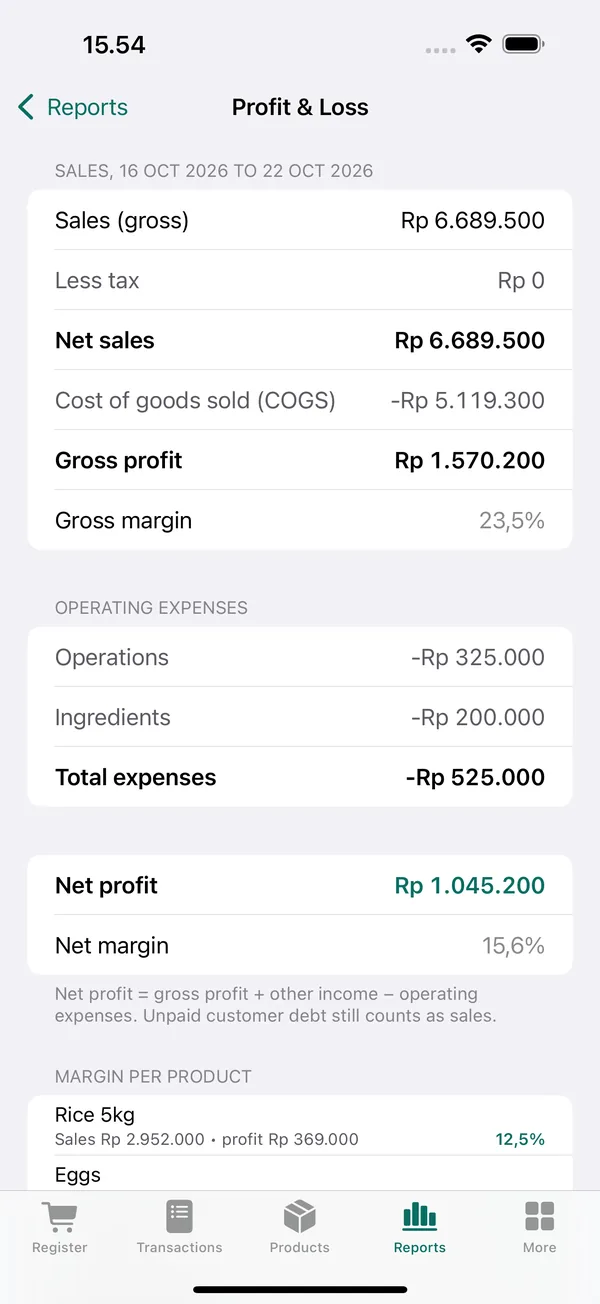
Read the screenshot above the same way as the example table. Net sales of Rp 6.689.500 minus the cost of the goods sold, Rp 5.119.300, gives a gross profit of Rp 1.570.200 (a gross margin of 23.5%). After operating expenses of Rp 525.000, net profit is Rp 1.045.200. A net margin of 15.6% means every Rp 100.000 of sales leaves about Rp 15.600.
The same screen shows the margin per product. From here you can spot items that sell well but earn thin profits. To archive the figures or send them to an accountant, tap Export Excel in the Reports tab to save an .xlsx file.
Keep in mind that KasirPOS is a POS and inventory app, not an accounting app. There are no journals, balance sheets, or tax filings. Its profit and loss report is good for keeping an eye on the business day to day. For formal financial statements, the Excel file from KasirPOS can be material for your accountant.
Frequently asked questions
What goes into a simple profit and loss statement?
A simple profit and loss statement contains sales, cost of goods sold (COGS), gross profit, operating expenses broken down by type, net profit, and margin as a percentage. For a small shop, this format is enough to see whether the business is making or losing money and which part needs fixing.
How do I make a profit and loss statement for a small shop?
Add up one month's sales, then subtract the cost price of the goods sold to get gross profit. Then subtract all operating expenses such as rent, wages, and electricity. The result is net profit. Divide gross profit and net profit by sales to get margins as percentages.
What's the difference between gross margin and net margin?
Gross margin is gross profit divided by sales, and it shows how far your selling prices sit above your cost prices. Net margin is net profit divided by sales, after all operating expenses are subtracted. If gross margin falls, check your prices. If only net margin falls, check your expenses.
Does buying stock count as an expense on a profit and loss statement?
Not directly. Only the cost price of goods that have been sold (COGS) goes into the statement. Goods still on the shelves count as stock. If all your restocking is recorded as an expense, the shop can look like it's losing money in a month when you stock up heavily.
Is there a free profit and loss app for iPhone?
KasirPOS is a free POS app for iPhone and iPad that creates a profit and loss report automatically from the transactions and expenses you record, with margin per product and Excel export. KasirPOS isn't an accounting app, so there are no journals or balance sheets, but it's enough to track the profit and loss of a small shop.