KasirPOS
How to Set a Selling Price from Cost: Markup and Margin Formulas
How to set a selling price from cost: markup vs margin, formulas, a conversion table, a per-carton example, rounding, and average cost price.
The simplest way to set a selling price: work out the cost price per item, multiply it by (1 + the markup you want), then round to an amount that's easy to pay. For example, a cost of Rp 10.000 with a 20% markup becomes Rp 12.000. Then compare it with prices at nearby shops.
What often trips people up is markup versus margin. Both are a profit percentage, but they're calculated from different numbers. Below are the formulas for both, a conversion table, an example worked out from a per-carton price, and how to set prices on an iPhone or iPad.
Markup vs margin
Markup is profit as a percentage of the cost price. Margin is profit as a percentage of the selling price. The formulas:
Markup = (Selling price − Cost price) ÷ Cost price × 100%
Margin = (Selling price − Cost price) ÷ Selling price × 100%
Example: an item that costs Rp 10.000 sells for Rp 12.000. The profit is Rp 2.000. The markup is 20% (Rp 2.000 of Rp 10.000), but the margin is only 16.7% (Rp 2.000 of Rp 12.000).
The difference matters because a profit and loss statement uses margin, meaning profit divided by sales. If you aim for 20% profit on sales but price with a 20% markup, you'll always fall short of your target.
Formulas for setting a selling price from cost
There are two ways to calculate a selling price, depending on which benchmark you use.
- With markup: Selling price = Cost price × (1 + markup). A cost of Rp 10.000 with a 25% markup becomes Rp 10.000 × 1.25 = Rp 12.500.
- With a target margin: Selling price = Cost price ÷ (1 − margin). A cost of Rp 10.000 with a 20% target margin becomes Rp 10.000 ÷ 0.8 = Rp 12.500.
Both examples give the same price, because a 25% markup equals a 20% margin. The table below helps convert markup to margin. The formula: margin = markup ÷ (1 + markup).
| Markup | Selling price at a cost of Rp 10.000 | Margin |
|---|---|---|
| 10% | Rp 11.000 | 9.1% |
| 15% | Rp 11.500 | 13.0% |
| 20% | Rp 12.000 | 16.7% |
| 25% | Rp 12.500 | 20.0% |
| 30% | Rp 13.000 | 23.1% |
| 50% | Rp 15.000 | 33.3% |
| 100% | Rp 20.000 | 50.0% |
Look at the last row: a 100% markup means the selling price is twice the cost, but the margin is only 50%. Margin can never reach 100%.
Example: setting a warung price from a per-carton cost
Most goods in a warung (a small neighborhood shop) are bought by the carton or pack and sold individually. For example, a carton of 40 packs of instant noodles costs Rp 115.000.
- Work out the cost per pack: Rp 115.000 ÷ 40 = Rp 2.875.
- Add the markup, for example 20%: Rp 2.875 × 1.2 = Rp 3.450.
- Round up to the nearest Rp 500: Rp 3.500.
At Rp 3.500, the profit per pack is Rp 625. The markup becomes 21.7% and the margin 17.9%. If the transport cost of restocking is significant, spread it across each item too before working out the cost per pack.
Tip: Round prices up, not down. If Rp 3.450 is rounded down to Rp 3.000 to look cheap, the profit per pack drops to Rp 125, a 4.2% margin. That isn't enough to cover plastic bags, electricity, and damaged goods.
Rounding to Rp 500 or Rp 1.000 also makes change easier and speeds up the line. For cheap items, multiples of Rp 100 or Rp 500 usually work better.
Average cost price when supplier prices differ
Supplier prices change often. As a result, the same item on the shelf can have different cost prices. Use the average cost price as the basis for your selling price.
Example: you still have 10 pcs at a cost of Rp 12.000, then buy another 20 pcs at Rp 13.500. The average cost price is:
(10 × Rp 12.000 + 20 × Rp 13.500) ÷ 30 = (Rp 120.000 + Rp 270.000) ÷ 30 = Rp 13.000
So the selling price is calculated from Rp 13.000, not Rp 12.000. With a 20% markup, the price is Rp 15.600, rounded to Rp 16.000. If you keep using the old cost, your profit looks bigger on paper than it really is, as explained in the guide on how to calculate shop profit.
Wholesale prices must never go below cost
A wholesale price can be lower than the retail price, but it still has to be above cost. Continuing the instant noodle example: retail is Rp 3.500, and the wholesale price is Rp 3.200 for a minimum purchase of 10 packs.
At the wholesale price of Rp 3.200, the profit per pack is Rp 325, a 10.2% margin. If a customer buys a whole carton of 40 packs, they pay Rp 128.000. Compared with the cost of Rp 115.000, you still make Rp 13.000. How to set the minimum quantity and the price difference is covered in the article on wholesale and retail pricing.
Check local prices and review when supplier prices rise
The formula gives you a starting point, but buyers compare with other shops. Check prices at nearby warungs and stores, especially for items whose prices shoppers remember, such as rice, sugar, cooking oil, and eggs.
For items like these, a thin margin is fine as long as it stays above cost. Take a bigger margin on items people rarely compare, such as seasoning sachets, snacks, or household supplies.
Review your prices every time the supplier price goes up. Say the carton of instant noodles rises to Rp 124.000, so the cost per pack is Rp 3.100. If the selling price stays at Rp 3.500, the profit drops to Rp 400 per pack: a 12.9% markup and an 11.4% margin.
To get back to a markup of about 20%, the selling price needs to be Rp 3.720. Round it to Rp 3.800 if you use multiples of Rp 100, or Rp 4.000 if you use multiples of Rp 500. Pick the one that still makes sense compared with nearby prices.
Setting selling and cost prices in KasirPOS (iPhone/iPad)
Pricing hundreds of items is easier when the cost prices are stored neatly. KasirPOS, a free iPhone POS app that also runs on iPad, stores three prices for every product.
- Selling price, cost price, and wholesale price. Fill them in for each product in the Products tab. Also enter the minimum wholesale quantity so the wholesale price is applied automatically at the register. Extra units such as cartons or packs can have their own price and barcode.
- Automatic average cost price. Record restocking in More › Stock, Purchases & Stock Count › Purchases / Stock In. The average cost price is recalculated automatically, just like the example above.
- Margin per product. Open the Reports tab, tap View profit & loss report, then check the margin per product to find items whose profit is too thin.
- Cost hidden from cashiers. Cashiers without the "View cost & profit" permission don't see cost prices. Set this in More › Users, Cashiers & PIN.
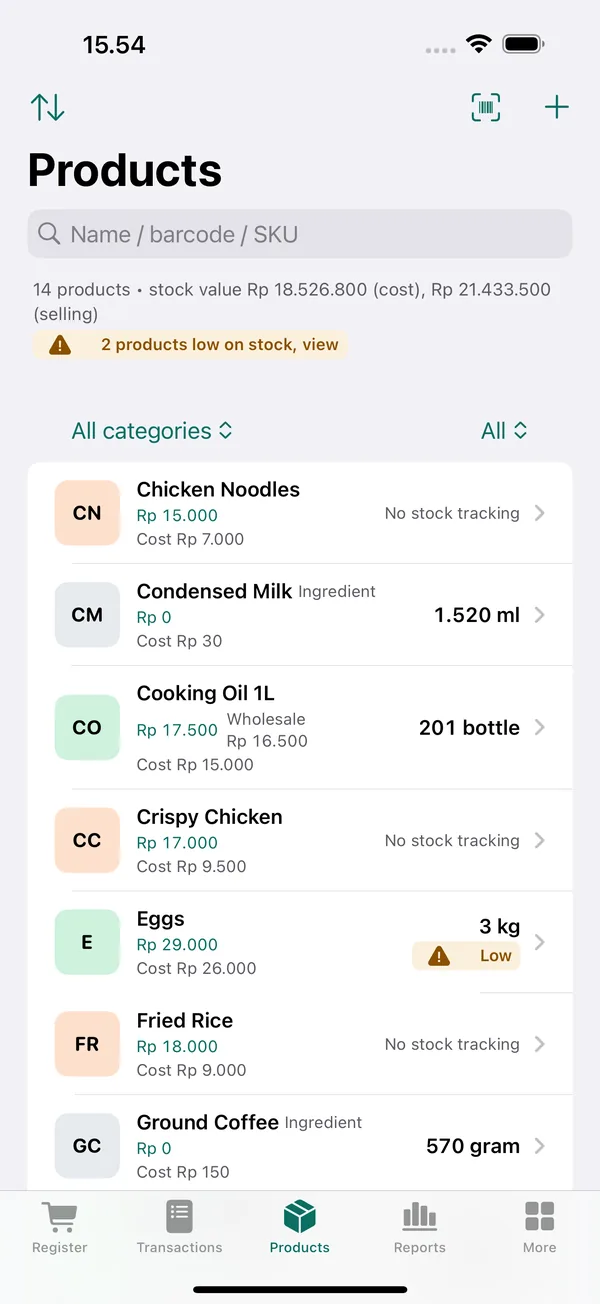
If you have a lot of products, the selling price, cost price, wholesale price, and minimum wholesale quantity can all be filled in at once from an Excel file. See the guide to importing products from Excel into a POS app and the products help page.
Once prices are set, check the results every month with a simple profit and loss statement. If your gross margin drops, there's usually a price that hasn't kept up with a cost increase.
Frequently asked questions
What's the formula for a selling price from cost?
Multiply the cost price by (1 + markup). For example, a cost of Rp 10.000 with a 20% markup becomes Rp 12.000. If you use a target margin, divide the cost price by (1 − margin). A cost of Rp 10.000 with a 20% target margin becomes Rp 12.500. Then round up so it's easy to pay.
What's the difference between markup and margin?
Markup is profit divided by the cost price, while margin is profit divided by the selling price. An item that costs Rp 10.000 and sells for Rp 12.000 has a 20% markup but a 16.7% margin. A profit and loss statement uses margin, so make sure you know which number you're using.
What's a reasonable profit percentage for warung goods?
There's no fixed number. Staples whose prices shoppers often compare usually have thin margins, while snacks and small household items can be higher. A more useful benchmark: total gross profit for the month must cover all operating expenses and still leave a net profit.
How do I set a selling price when supplier prices keep changing?
Use the average cost price. Add up the value of the old and new stock, then divide by the total quantity. For example, 10 pcs at Rp 12.000 plus 20 pcs at Rp 13.500 gives an average of Rp 13.000. A POS app like KasirPOS on iPhone and iPad calculates it automatically when you record a purchase.
Can cost prices be hidden from cashiers?
Yes, if your POS app supports per-staff permissions. In KasirPOS for iPhone and iPad, each cashier logs in with their own PIN. Turn off the "View cost & profit" permission for that cashier, and they won't see cost prices or profit, while the owner still sees everything.